command
your inbox
Your inboxes deserve the best email client.
Multiple accounts, your choice of integrated, context-aware AI, automations and a wealth of unique features. A customizable messaging cockpit with the controls within reach.
 postshell / live workspace
All your mail, in one workspace.
Accounts, categories, messages and assistant. Every panel has its place, and its own width.
AI when you need it
Dictate, choose the context and refine your text. The assistant works with you right inside the composer.
Automations
Conditions, AI models and actions. Build your logic, then dry-run the flow.
Your layout, without starting from scratch.
Headings, columns, buttons and images: a workshop for the emails you want to send.
Your messages, ready to pick up.
Reusable drafts, scheduled sends and campaigns. Prepare your messages and choose when and how to send them.
Discover the PostShell cockpit
For the “there should be a setting for that” kind of person. Explore the tools, screenshots and every detail, right here.
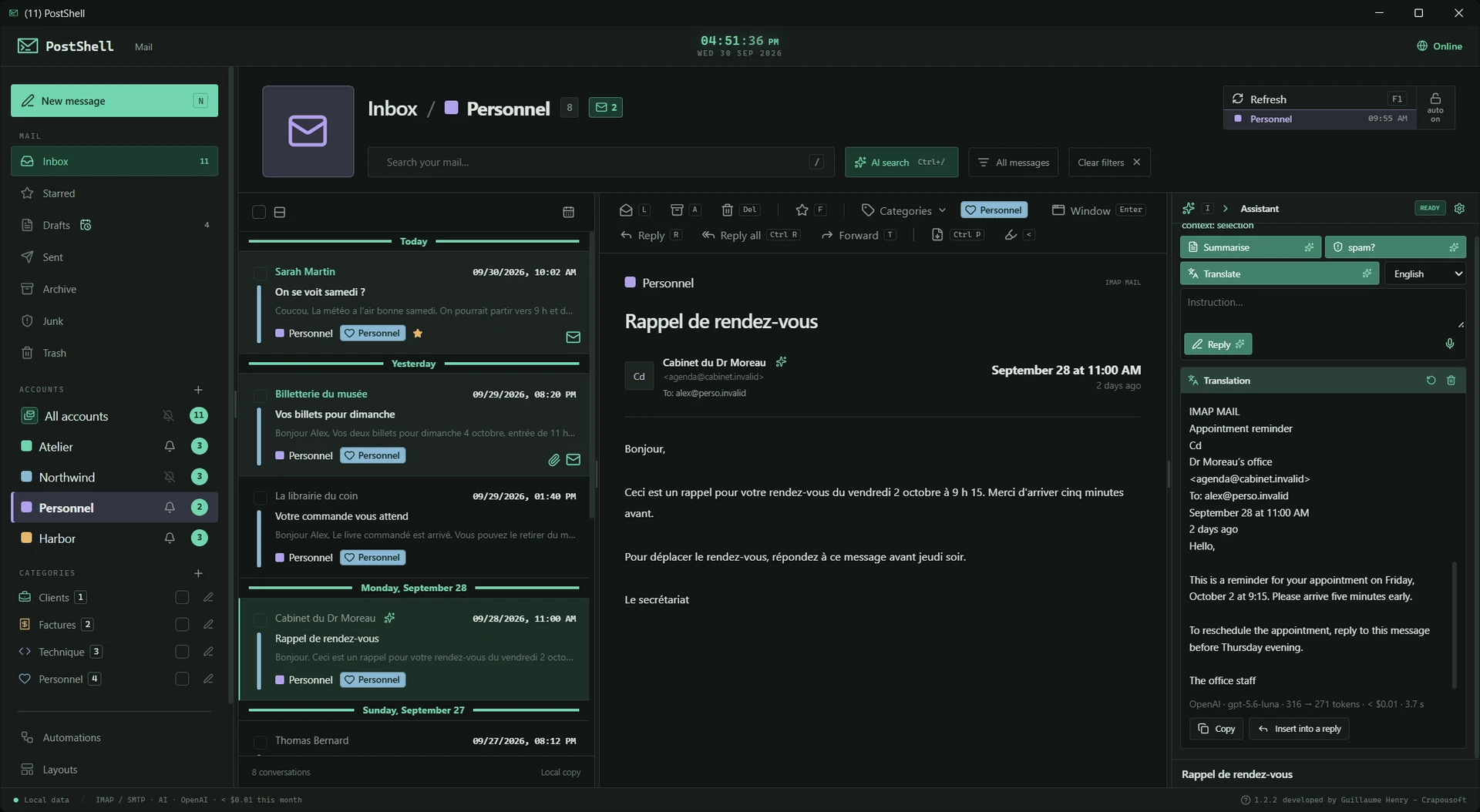
01 / accounts.connect()Your inboxes, your way.
Your email plus WhatsApp, Messenger, Telegram and Instagram in tabs. Switch between conversations inside PostShell.
 IMAP / SMTPExploreCollapse
Your inboxes, your way.
Your email plus WhatsApp, Messenger, Telegram and Instagram in tabs. Switch between conversations inside PostShell.
A unified email inbox, per-account views and instant messaging in tabs. Bring your conversations into one cockpit while keeping each service’s own identity.
Connect & sync
- Add multiple IMAP/SMTP accounts, including Gmail with a compatible setup.
- Configure servers, polling frequency and the period of mail to import.
- Receive mail in real time through IMAP IDLE on compatible servers.
- Map IMAP folders to PostShell mailboxes and manage your folders.
- Move messages between accounts and pause automatic polling when needed.
Your identities
- Browse the unified inbox or focus on one account.
- Customize account colors, images, display names or addresses, and account order.
- Create rich signatures for each account.
- Describe each account’s role to give the AI useful context.
Your messaging apps in tabs
- Access WhatsApp, Messenger, Telegram and Instagram inside PostShell.
- Enable the services you want; each keeps its own session.
- Switch from email to conversations through the app’s tabs.
- Manage notifications per service and clear a session from settings.
i /Messaging tabs use their providers’ web services and require internet access and an account. Their sessions are separate from the email database and are not covered by its encryption. Email connectivity depends on provider requirements; IMAP IDLE requires a compatible server.
02 / inbox.organize()Filter, sort, find.
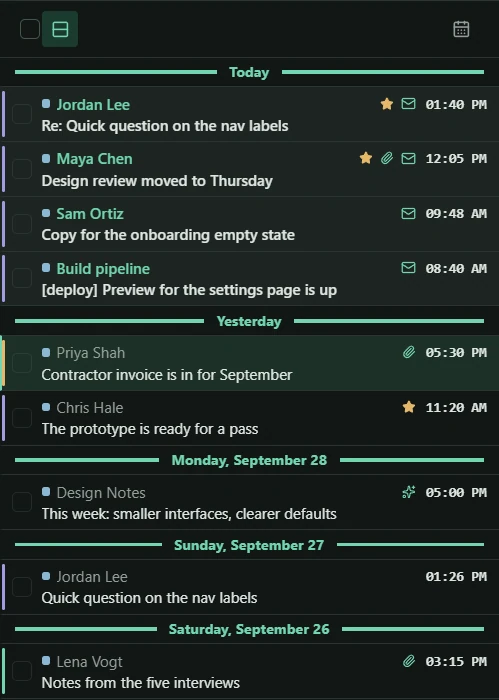
Day separators, colored categories and precise filters. Give your message list some structure.
 DAY SEPARATORSExploreCollapse
Filter, sort, find.
Day separators, colored categories and precise filters. Give your message list some structure.
Spot the day, account and topic at a glance. Then organize ten messages as easily as one.
Scan the list
- Day separators and compact or large-card layouts.
- Filter by account, category, read status, date or period.
- Colored cues and icons for annotations and AI results.
- Instant accent-insensitive keyword search with highlighted results.
Organize your way
- Custom categories: name, color, icon and keyboard shortcut.
- Assign several categories to the same message.
- Select multiple messages to categorize, archive, move or trash.
- Favorites, read/unread states and undo for supported message changes.
03 / message.inspect()Smart reading.
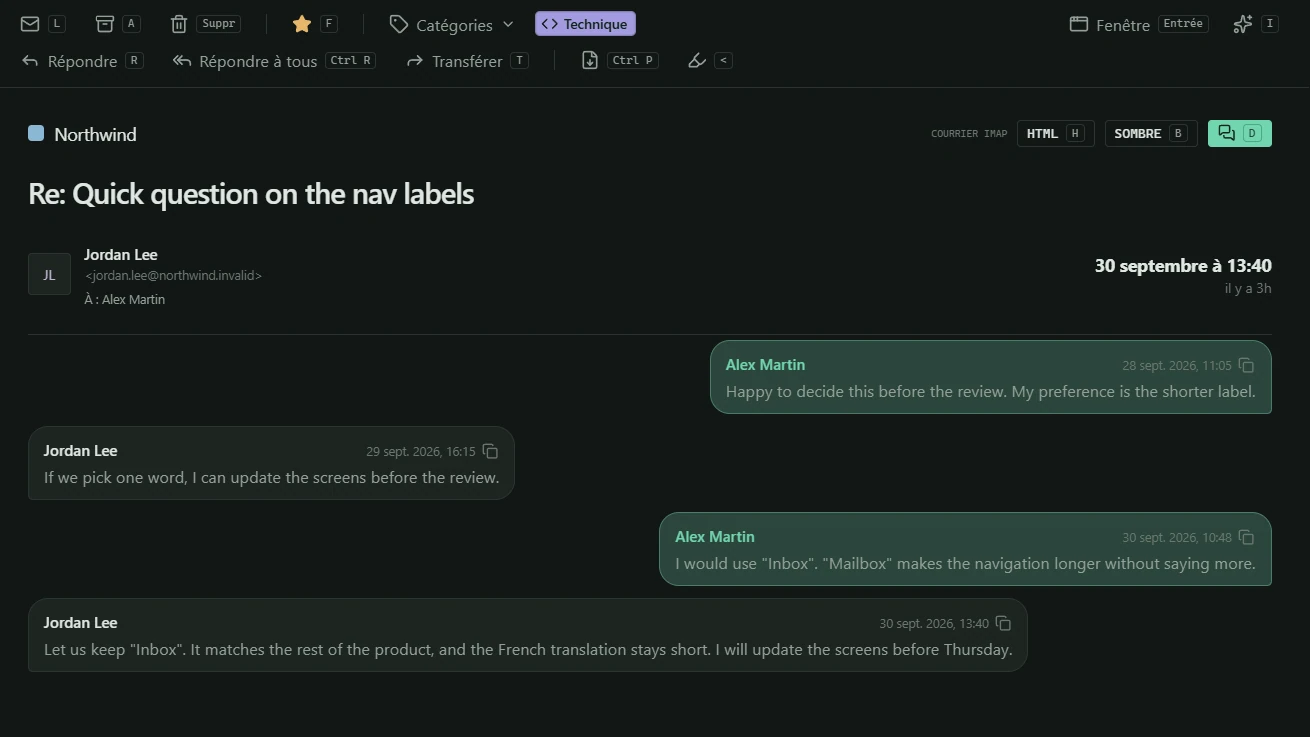
Discussion view, notes and highlights. Keep the important details right where they belong.
 DISCUSSION VIEWExploreCollapse
Smart reading.
Discussion view, notes and highlights. Keep the important details right where they belong.
Turn nested replies into a readable discussion. Highlight a deadline, note a decision, preview a file: everything stays beside the email.
Understand & remember
- Smart discussion view for recognized reply chains quoted inside a message.
- Personal notes and colored highlights, stored locally and linked to the email.
- Receipt date and elapsed time since the message arrived.
- Jump to your sent reply from the replied icon.
Keep it all in reach
- HTML or plain text, light or dark, with per-sender preferences.
- Enter opens the message in a separate window; export it as PDF.
- Preview PDFs, images, documents, spreadsheets, text, audio and video where supported.
- Drag attachments out, or download individual files or the whole set.
- Right-click actions on email addresses.
- Newsletter unsubscribe shortcut and unwanted-sender blocking.
i /Discussion view reconstructs quoted replies within a message. File previews vary by format. Unsubscribe opens the detected link.
04 / message.compose()A composer with a proper toolkit.
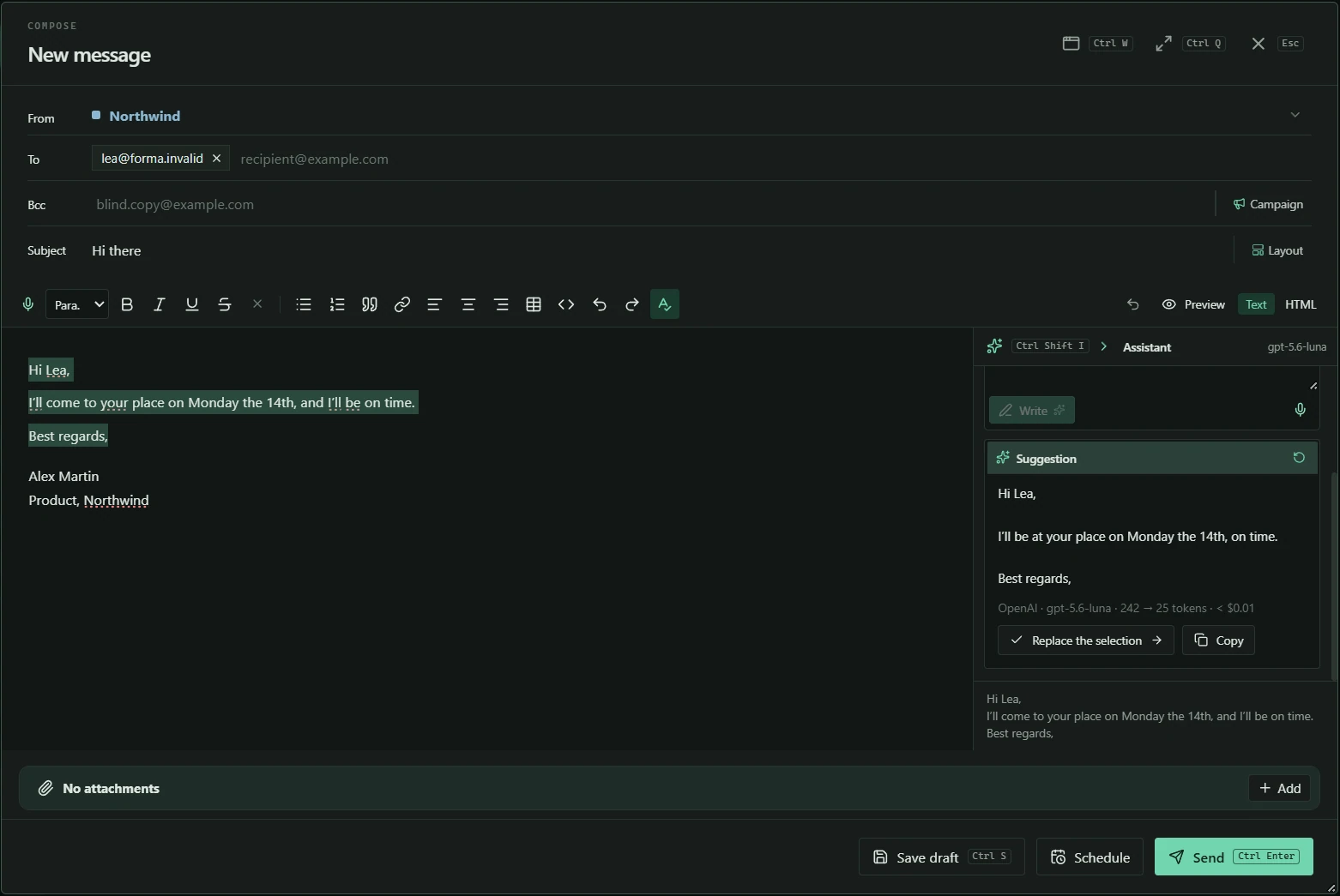
HTML, spelling, ZIP and resized images. Get the words and the details right.
 RICH TEXT / HTMLExploreCollapse
A composer with a proper toolkit.
HTML, spelling, ZIP and resized images. Get the words and the details right.
Write inside the cockpit or pop out a window. Prepare your text, tune your files and check the result before sending.
Write without friction
- Embedded or standalone compose window and message preview.
- Plain text, HTML and rich formatting: headings, lists, links, colors and tables.
- Configurable suggestions from an editable local address book.
- Dictionary-based spellcheck, multiple languages and personal words.
- Remove the previous quoted message from a reply.
Prepare your files
- Drag and drop files into your message.
- ZIP compression and image resizing inside the composer.
- A reminder when you mention an attachment but forget the file.
- A configurable warning when attachments exceed your chosen size threshold.
05 / ai.bring_your_model()Your AI with the right context.
In the reader, composer and search. Your models and prompts call the shots.
 OLLAMA / LM STUDIOExploreCollapse
Your AI with the right context.
In the reader, composer and search. Your models and prompts call the shots.
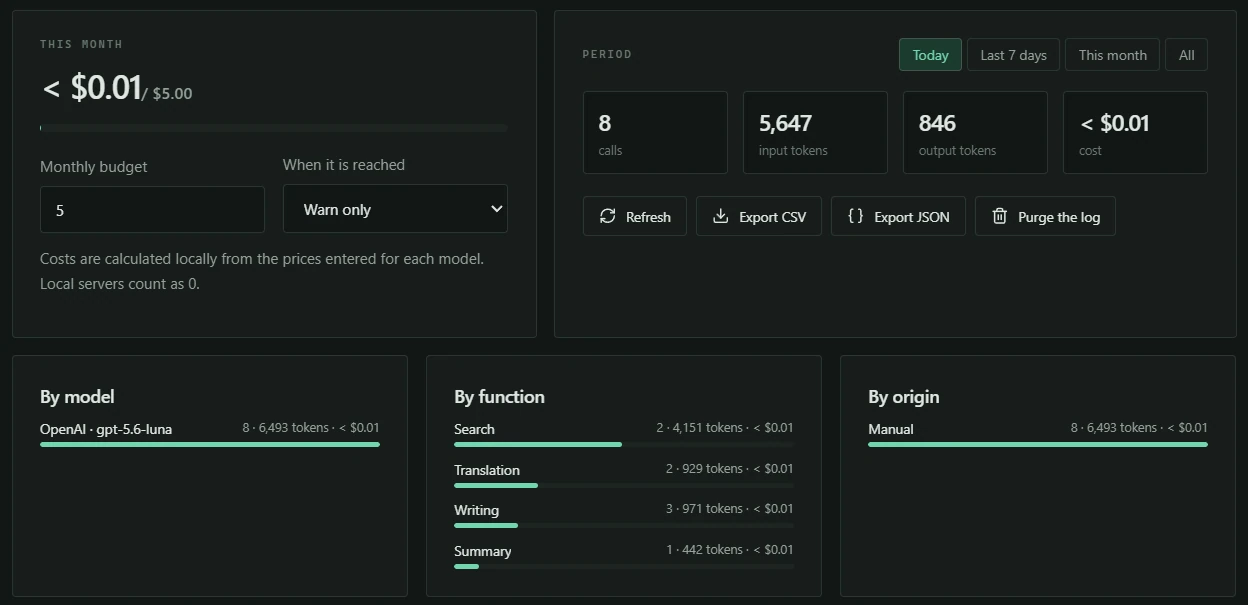
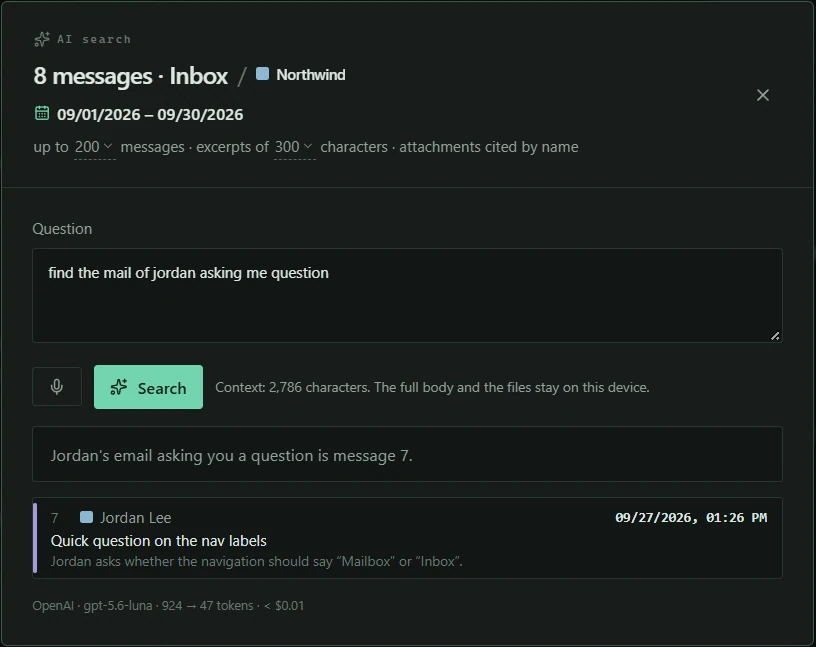
Summarize with one model, draft with another. AI uses the email or your selection, keeps results linked to the message and lets you approve the text.
Your AI stack
- Compatible providers with your own API keys, or local Ollama / LM Studio models.
- Per-function models, custom system prompts and account context.
- Temperature, reasoning and available model-specific parameters.
- Summaries, drafting, improvement, proofreading, translation and spam detection.
Right inside your email
- AI panel in the reader: use the whole email or a text selection.
- AI panel in the composer: insert or replace text once you approve the result.
- Quick right-click actions in both the reader and composer.
- Locally saved history and results, linked to the email and marked with an icon.
- Natural-language search scoped by account, mailbox or period.
Speak. Then refine.
- Dictate on demand with a compatible transcription engine, via button or shortcut.
- Optional AI formatting for dictation: punctuation, paragraphs and line breaks.
i /AI and dictation require a configured compatible engine. AI search analyzes a bounded, configurable set of messages. With remote AI, your selected content is sent to that provider.
06 / on.receive → your.workflowNode-based automations.
Triggers, conditions, AI blocks and actions. Build the workflow your inbox was waiting for.
 VISUAL WORKFLOWSExploreCollapse
Node-based automations.
Triggers, conditions, AI blocks and actions. Build the workflow your inbox was waiting for.
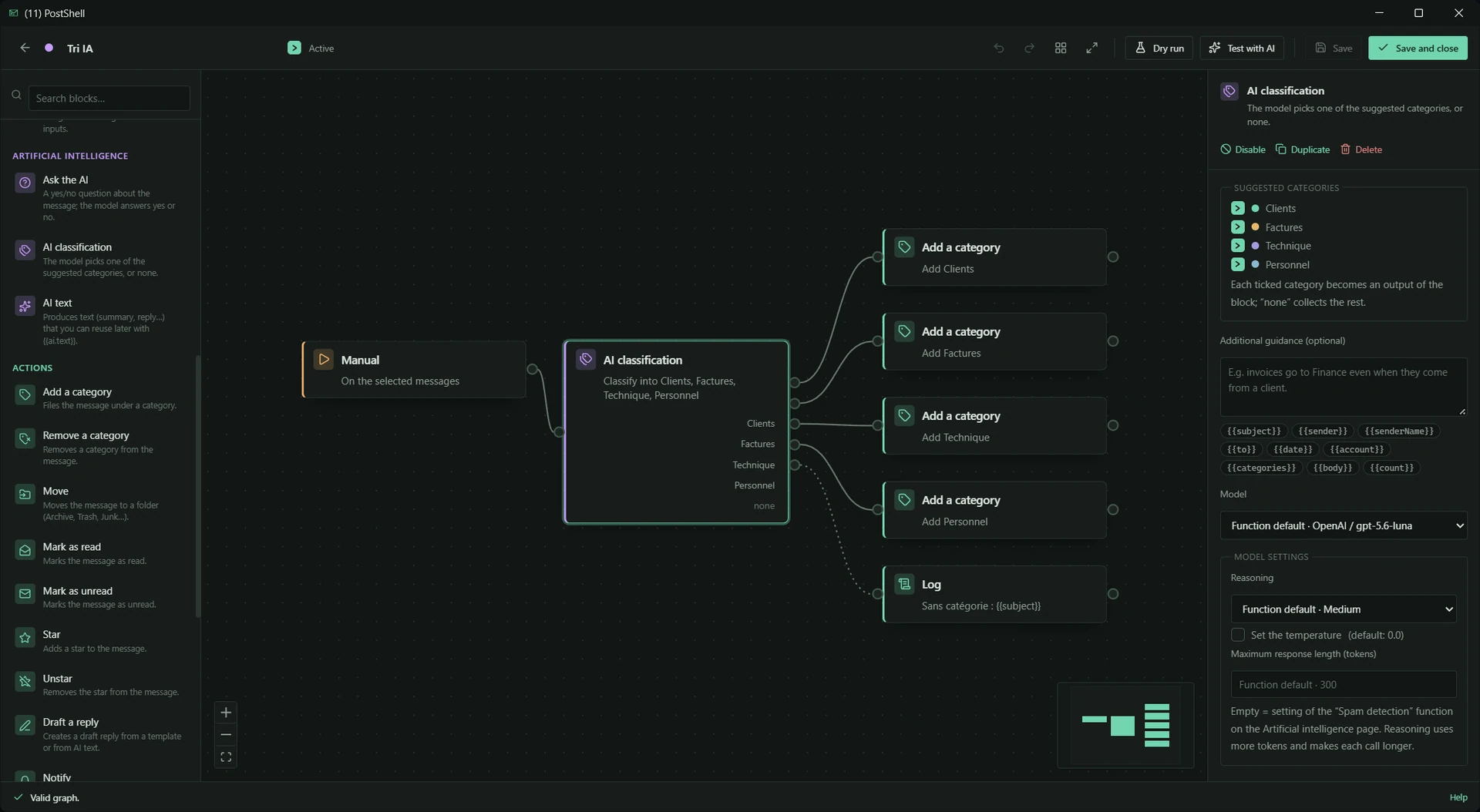
When email arrives, analyze it, organize it, prepare a reply or build a digest. Connect the blocks, dry-run the flow, then see exactly what happened.
Build
- Visual node editor, connections, automatic layout and undo.
- Run on startup, on mail checks, on a schedule or manually.
- Conditions and AND/OR gates to combine your criteria.
- Actions: category, folder, read/favorite, draft, notification and log.
Put AI to work
- Analyze, classify and generate replies inside your flows.
- Configure the model and AI parameters for each block.
- Group messages for combined analysis or a shared digest.
Test & control
- Dry run: inspect the intended effects before applying actions.
- Starter templates and shortcuts in the sidebar or menus.
- Trigger and execution history.
- Message and AI-call limits, cooldowns and confirmation thresholds.
- JSON import and export to reuse your workflows.
07 / email.design()Email template workshop.
Columns, buttons, images and colors. Build email designs and reuse them on demand.
 BLOCK EDITORExploreCollapse
Email template workshop.
Columns, buttons, images and colors. Build email designs and reuse them on demand.
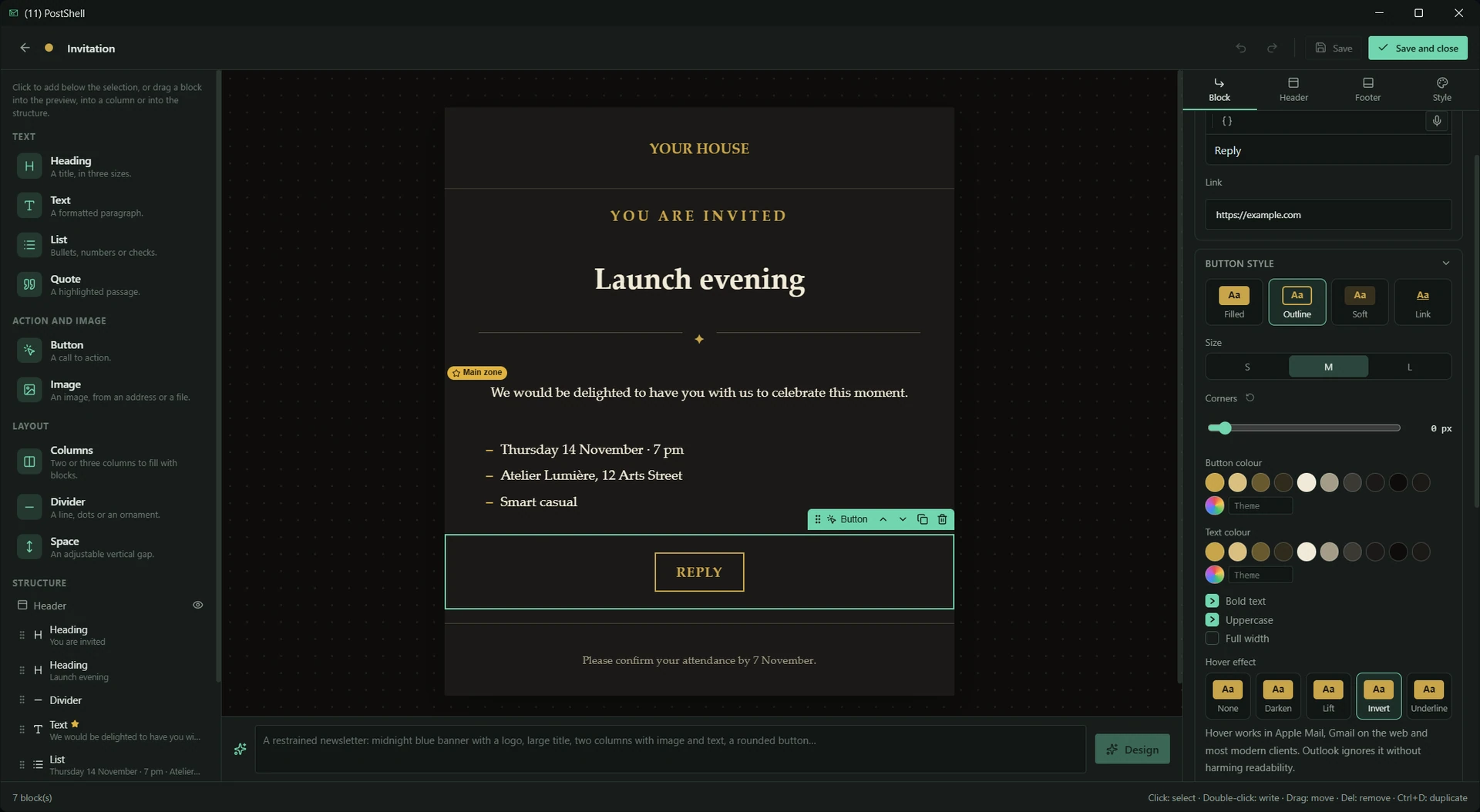
Prepare an invitation, announcement or branded email in the visual editor. Your library keeps each design ready for the next send.
Build the layout
- A simple visual editor built around blocks.
- Headings, text, columns, buttons and images.
- Customize colors, structure and presentation.
- Ask AI to help create a design.
Reuse
- A library of saved email designs.
- Insert a design on demand from the composer.
- Import and export your designs.
08 / campaign.send({{name}})Campaigns and bulk sending.
CSV, JSON, variables and a controlled pace. Keep the personal touch at scale.
 CSV / JSONExploreCollapse
Campaigns and bulk sending.
CSV, JSON, variables and a controlled pace. Keep the personal touch at scale.
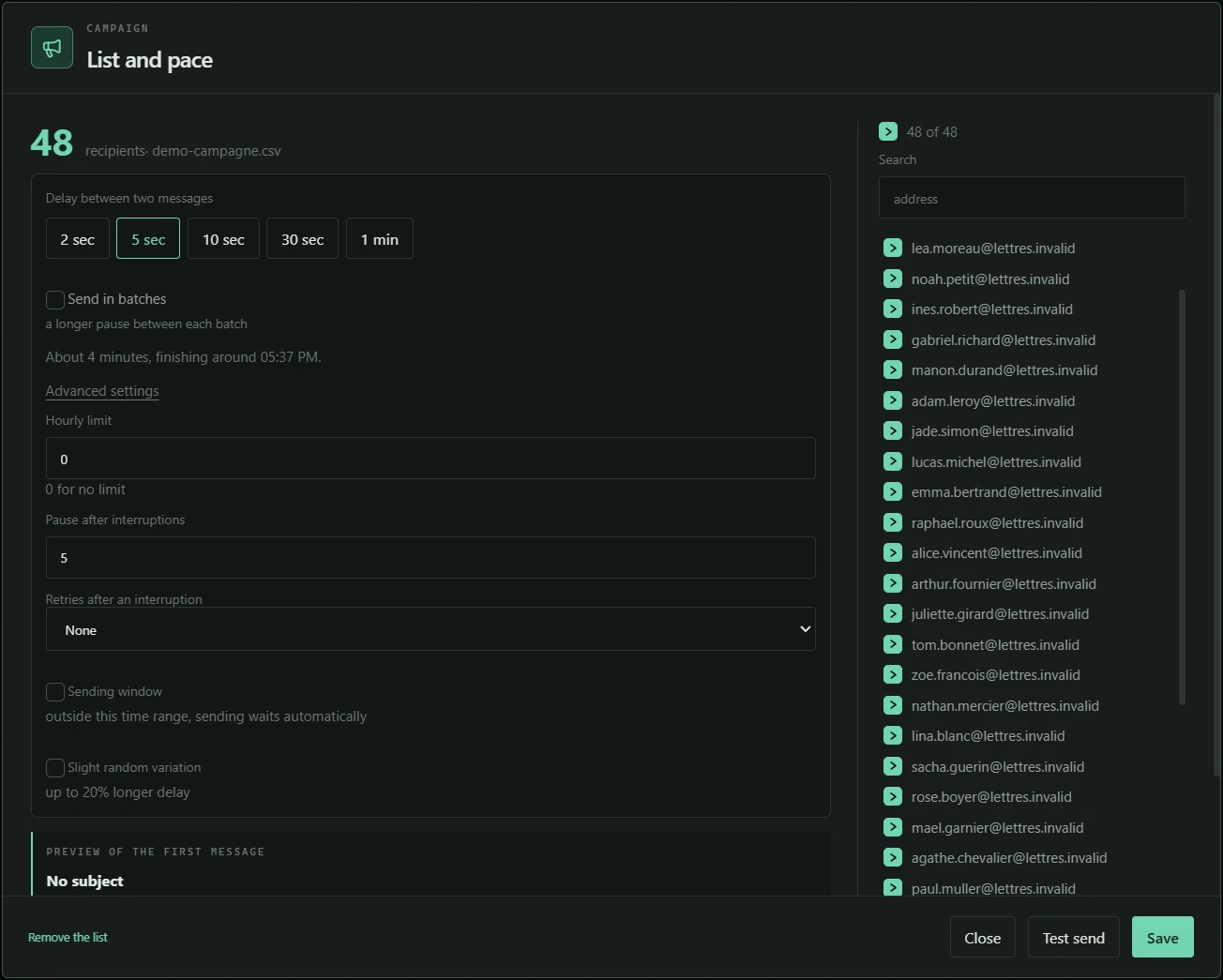
Import your list, add your fields, check a preview and a test email. Launch at your chosen pace and follow every result.
Personalize
- Import recipients from CSV or JSON.
- Variables from the fields in your imported list.
- A separate message for every recipient.
- Preview and test email before launch.
Control delivery
- Schedule your campaign.
- Delays, batches, hourly caps and sending windows.
- Progress tracking and pause controls.
- Reports for accepted, rejected or uncertain sends.
i /PostShell must stay open. Acceptance by the sending server does not guarantee inbox delivery or reading.
09 / draft.save().schedule()Drafts and scheduling.
Persistent drafts, reusable templates and scheduling. Prepare once, get the timing right.
 PERSISTENT DRAFTSExploreCollapse
Drafts and scheduling.
Persistent drafts, reusable templates and scheduling. Prepare once, get the timing right.
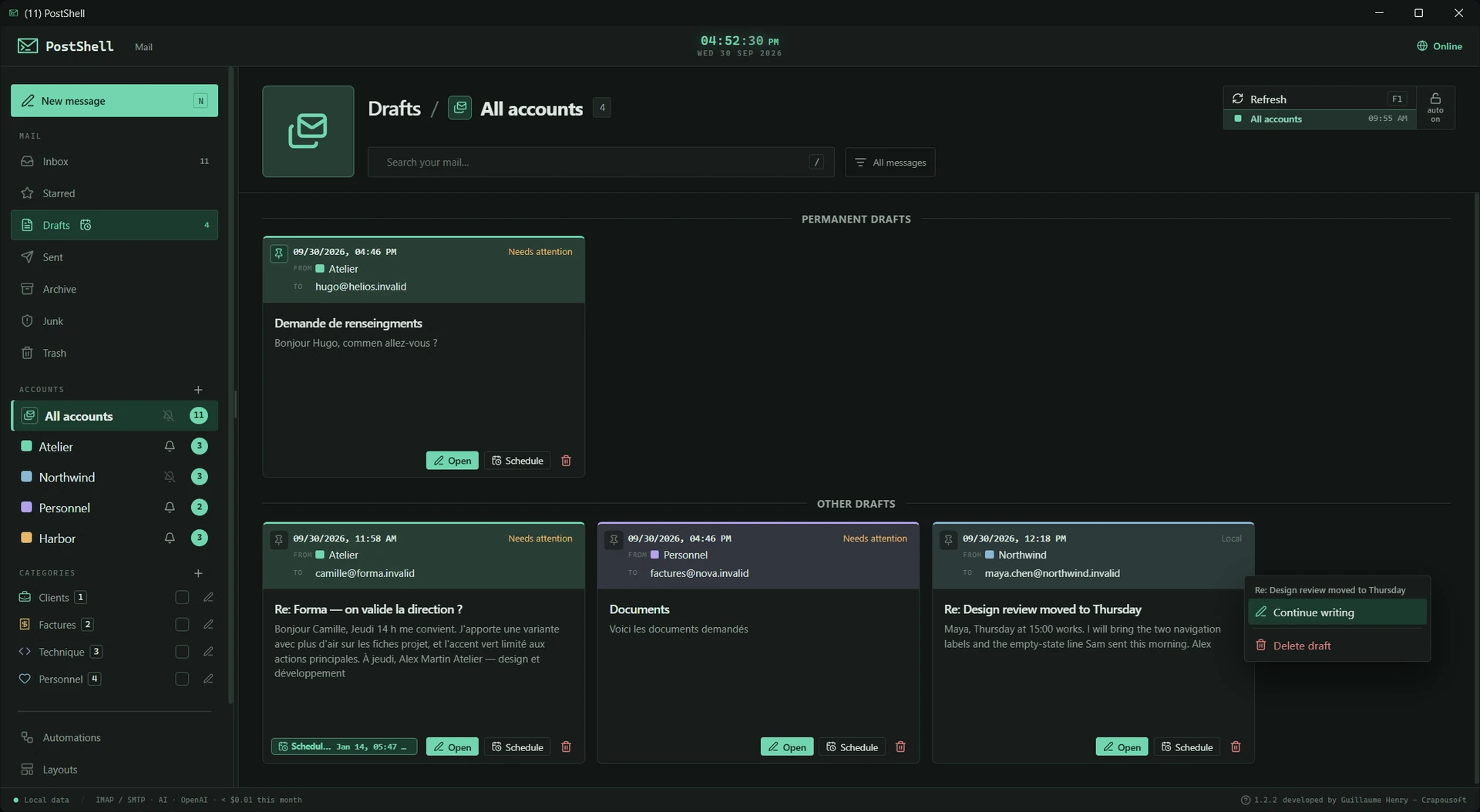
Your next email can wait for the right moment. Find drafts in their own workspace and keep recurring messages ready to reuse.
Save & reuse
- A dedicated drafts workspace.
- Drafts persist between sessions.
- Permanent reusable drafts for recurring messages.
Pick the moment
- Send at your chosen date and time.
- Optional catch-up on startup if the scheduled time was missed.
i /Scheduled sends run while the app is open; catch-up depends on your selected option.
10 / workspace.configure()Flexible customization.
Panels, shortcuts, pop-out windows and notifications. Tune your command center.
 KEYBOARD FIRSTExploreCollapse
Flexible customization.
Panels, shortcuts, pop-out windows and notifications. Tune your command center.
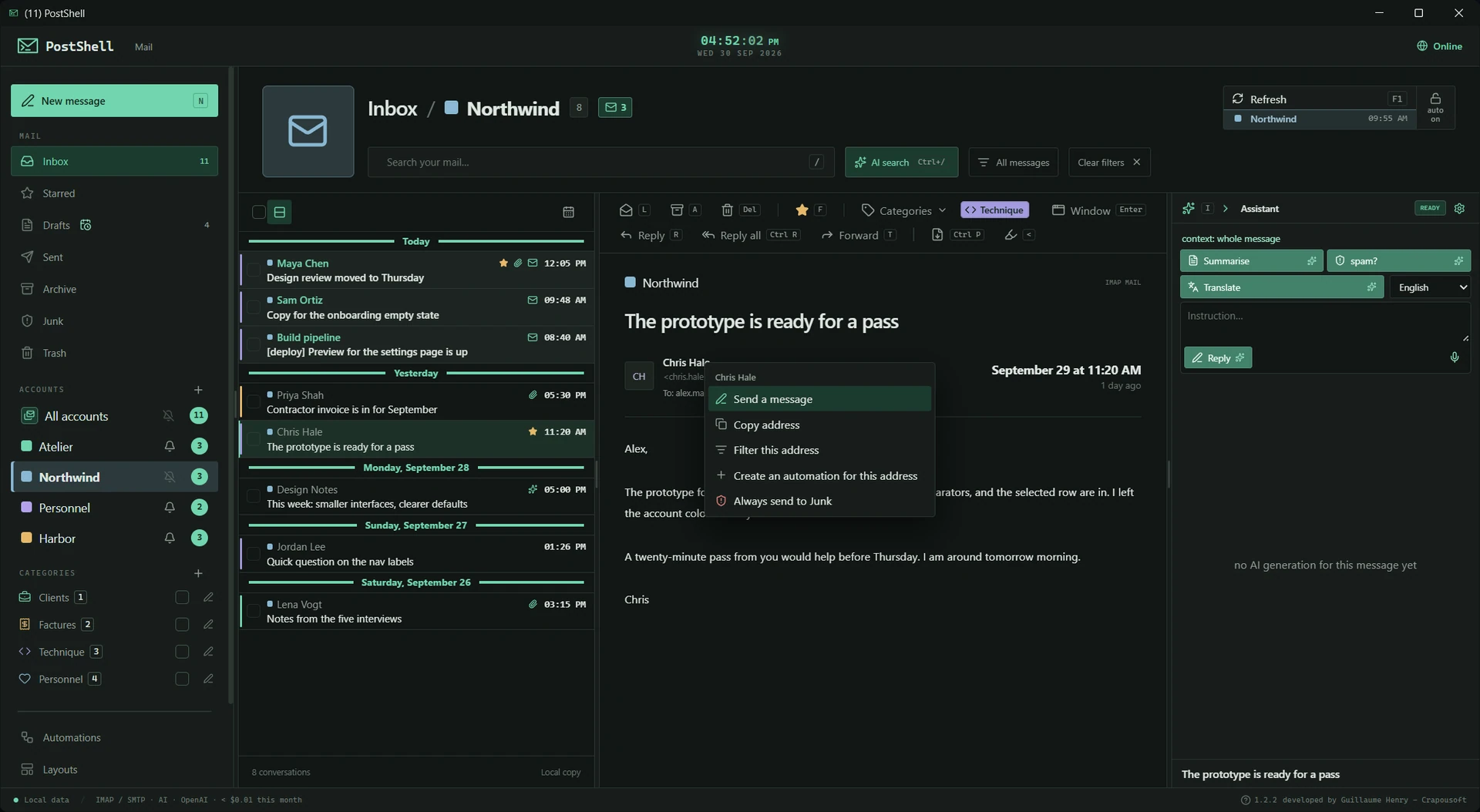
Density, widths, keyboard and interruptions: every detail shapes how you work. Your preferences are there next time you launch.
Your space
- Access accounts, folders, categories and filters in one interface.
- Resizable panels with remembered widths.
- Light/dark theme, density and reading layout.
- Messages and composing in separate windows.
- Quick-action buttons, contextual menus and keyboard navigation.
- Visible shortcuts and an activity log.
Your interruptions
- In-app or system notifications, configurable duration and sounds.
- Quiet hours and per-account or global mute.
- Open, reply, categorize or delete from notifications.
11 / ai.usage.inspect()Master your tokens.
Tokens, latency, per-function cost and monthly budgets. Know what your models consume.
TOKENS IN / OUTExploreCollapse
Master your tokens.
Tokens, latency, per-function cost and monthly budgets. Know what your models consume.
One inference, one log entry. Compare models, track which functions cost the most and set limits while keeping a record of calls.
Measure
- OpenRouter catalog prices where available.
- Estimated costs by model, function and call origin.
- Inference log: model, function, duration, input and output tokens.
- Breakdowns by day, model, function and origin.
Control
- Monthly budget with warnings or blocking depending on settings.
- Export usage data to CSV or JSON.
i /Costs are estimates based on available prices and usage data; your provider’s final bill may differ.
12 / data.keep_local()Your data. Your security.
Encrypt your entire local database and lock PostShell with a password. Configure protection to suit your needs.
 OPTIONAL ENCRYPTIONExploreCollapse
Your data. Your security.
Encrypt your entire local database and lock PostShell with a password. Configure protection to suit your needs.
Your messages stay on your computer. Enable full local database encryption and choose when to lock the app: at startup, on demand or automatically. You stay in control of your security.
Encrypt & lock
- Optional full local database encryption with AES-256 / SQLCipher.
- Messages, drafts, annotations, AI conversations and logs stored in the database protected at rest.
- Keep the key in Windows Credential Manager or protect it with your PostShell password.
- Lock at startup, on demand, after inactivity, on minimize or when Windows locks.
- Recovery key to reset a forgotten password.
Manage data
- Local database size, message count and database cleanup.
- Export and reimport your configuration.
- Back up and restore messages, accounts, settings and logs.
- Manage and move your license to another computer.
Choose connections
- Passwords and API keys in Windows Credential Manager.
- Backup credentials encrypted with your chosen password.
- Explicit permission for remote AI, or use local models.
- Detailed customization to fit the way you work.
i /Encryption is optional and protects the database file at rest. Messaging sessions and exported files are not covered. Backup protection is separate. Keep your recovery key safe.
13 / rust + sqlite → desktopSmooth and lightweight.
A Rust core, a local SQLite database. A desktop tool for people who like having settings.
RUSTExploreCollapse
Smooth and lightweight.
A Rust core, a local SQLite database. A desktop tool for people who like having settings.
PostShell brings email and advanced tools together in a Windows application. An architecture designed for responsiveness, with your data on your machine.
Architecture
- Rust core and local SQLite database.
- Designed for responsiveness and controlled memory usage.
- Email stored on your computer.
Every day
- Optional update check on launch.
- Interface available in French and English.
Your machine. Your rules.
Your email database lives on your computer. Encrypt the entire database if you choose, configure password lock and decide what goes out to your AI providers.
- Optional full local database encryption
- Configurable password lock
- Remote AI only when you enable it
Encryption protects the local database at rest when enabled. Messaging sessions and exported files are separate. Online AI services process the content you choose to send.
❯ cat preferences.json
{
  "storage": "local",
  "encryption": "your_choice",
  "password_lock": "configurable",
  "ai_provider": "your_choice",
  "workflows": "your_rules",
  "subscription": false
}
✓ You are in control.
A few answers. No mystery flags.
Open a line. The answer follows.
Is PostShell a subscription?
No. PostShell is available with a one-time license, with no PostShell subscription. AI providers may charge separately for their services.
Which platforms and email accounts are supported?
PostShell is available now for Windows, with a one-time license currently priced at €19.99. macOS and Linux versions are in development. PostShell supports accounts configured through IMAP and SMTP. Compatibility depends on your provider’s authentication requirements. Microsoft accounts (Outlook.com, Hotmail, Live, etc.) are currently not supported by PostShell because of authentication restrictions imposed by Microsoft.
Can I choose my own AI?
Yes. Connect compatible online providers with your own API keys, or local models through Ollama or LM Studio. Choose models and prompts for each function. We are working to integrate AI provided by PostShell in the future. PostShell will always remain open to the model providers of your choice. Provider fees are separate from the PostShell license.
Does my email stay on my computer?
PostShell stores its email database locally. You can encrypt the entire database and protect access with a password. Encryption is optional and protects data at rest. Messaging tabs connect to their respective providers; their sessions are separate from the database. If you enable online AI, selected content is sent to that provider.
Does scheduled sending work when the app is closed?
PostShell must be open to send scheduled emails and run campaigns. Scheduled messages can optionally be caught up when you reopen the app.
Can I encrypt my email and lock PostShell?
Yes. Enable optional full database encryption and configure password lock at startup, on demand or automatically. Protect the encryption key with your PostShell password for stronger local protection, and keep your recovery key safe.
Which instant messaging services can I use?
WhatsApp, Messenger, Telegram and Instagram open in tabs inside PostShell. Enable your chosen services and sign in to each one. They use their providers’ web services; internet access is required.
Is my license tied to my computer?
No. You can migrate your license and transfer your email, accounts and settings using a backup. Backup passwords and API keys are protected by your chosen password. Local database encryption is configured separately; it does not automatically protect exported files or messaging sessions.
Your inbox has potential. Give it a command line attitude.
One application. A whole toolkit. No recurring PostShell subscription.
Get PostShell